Geometry Arrow 2
Geometry Arrow 2
97%
3496Votes

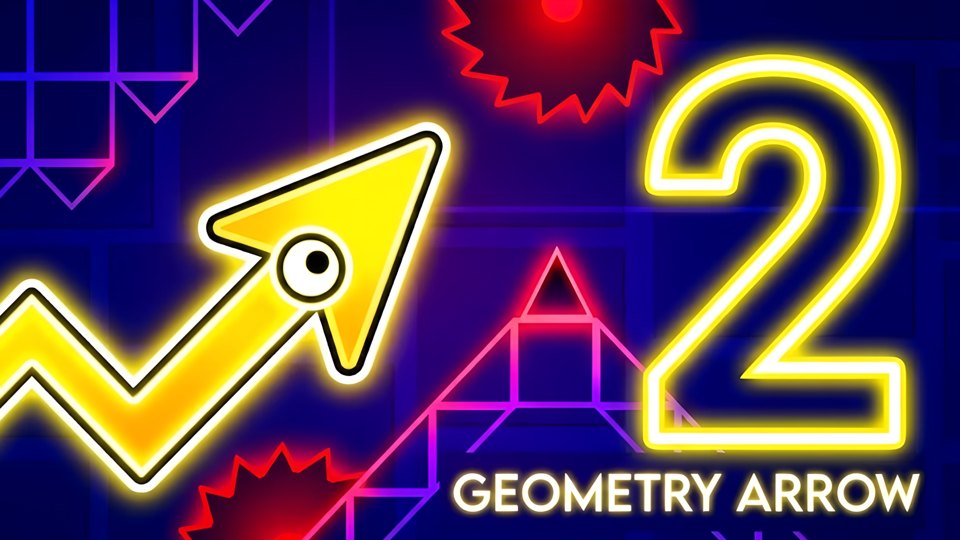
Geometry Arrow 2 — the sequel to the dynamic arcade game about an arrow navigating through a dangerous cave. The goal is simple: reach the end of the cave and survive. Along the way, you'll have to dodge a variety of unique and challenging obstacles. In this new chapter, a second playable character — the Wheel — joins the adventure! You can now customize your arrow and wheel with different skins, as well as change particle effects and block textures to make the game feel truly yours. The game features 6 levels with increasing difficulty. Each level combines both Arrow and Wheel gameplay segments, offering variety and challenge. Unlock achievements as you progress and show off your skills!

Use your mouse to play

Geometry Arrow 2

97%
3496Votes

Geometry Arrow 2 — the sequel to the dynamic arcade game about an arrow navigating through a dangerous cave. The goal is simple: reach the end of the cave and survive. Along the way, you'll have to dodge a variety of unique and challenging obstacles. In this new chapter, a second playable character — the Wheel — joins the adventure! You can now customize your arrow and wheel with different skins, as well as change particle effects and block textures to make the game feel truly yours. The game features 6 levels with increasing difficulty. Each level combines both Arrow and Wheel gameplay segments, offering variety and challenge. Unlock achievements as you progress and show off your skills!

Game features

Play read: Tips overlap Most advice for the arrow carries over to the wheel: commit early, read the ceiling, and never tap just because empty space appears. Session fit: Geometry Arrow 2 is best treated as a arcade game candidate when careful observation before each move is more important than a long tutorial; page clue: Restarts are quick, keeping the focus on timing instead of menu friction. Before playing longer: Choose one of the 6 levels in the menu and start the game by clicking it with the left mouse button, the SPACEBAR or your finger; then judge the opening rhythm against this cue: Replay value The best reason to return is the clean restart loop. Device and pacing note: Geometry Arrow 2 is worth checking on both desktop and mobile, especially because Replay value The best reason to return is the clean restart loop. Comparison cue: That makes it compelling in short sessions, less generous in long ones.

Controls

Choose one of the 6 levels in the menu and start the game by clicking it with the left mouse button, the SPACEBAR or your finger. PC controls: ─ LEFT MOUSE BUTTON or SPACEBAR ─ arrow movement; ─ ESCAPE ─ exit the level. MOBILE controls: ─ TOUCHING THE SCREEN ─ movement of the arrow.

Recommendation

Geometry Arrow 2 is a good arcade game candidate when this note sounds like the session you want: If a particle trail distracts you, switch it before blaming the level design. Start by checking the input style: Choose one of the 6 levels in the menu and start the game by clicking it with the left mouse button, the SPACEBAR or your finger. If that control setup feels awkward, compare keyboard, mouse, and touch expectations before you commit while using this page-specific note as the tie-breaker: The weakness is variety: the game is tuned well, but it leans hard on sharp timing rather than broader surprises. Geometry Arrow 2 is worth checking on both desktop and mobile, especially because It is best for players who like clean inputs, fast restarts, and the quiet humiliation of missing a gap they absolutely saw coming.

Geometry Arrow 2 Review: Tight Reflexes, Sparse Mercy

I expected a basic cave-dodger, but Geometry Arrow 2 earns its 97% community approval rating with sharp character switching and fast restarts. It is also rather proud of its punishing hitboxes.

First impressions

The opening runs are brisk, bright, and immediately unforgiving. The cave layout sells danger without much ornament, so your attention goes to the arrow line, the wheel sections, and the next hateful wedge of geometry. Restarting is quick enough to keep mistakes from feeling expensive, which matters because the game starts collecting them almost immediately.

Core loop

The arrow segments ask for pressure control: hold to climb, release to drop, and stop admiring your own correction because another spike is already waiting. Wheel moments change the tempo with ground contact and jumps, which is a useful disruption. The collision rules feel strict, occasionally to the point of pettiness, especially when a corner seems brushed rather than struck.

Progression

Each stage mixes familiar hazards with just enough new spacing to make muscle memory unreliable. The cosmetic shop is not essential, but arrow skins, wheel skins, particles, and block textures do give repeated attempts a little ownership. Achievements add small targets without turning the menu into paperwork, and they suit the short retry cycle well.

Tips overlap

Most advice for the arrow carries over to the wheel: commit early, read the ceiling, and never tap just because empty space appears. Still, the wheel needs a different eye. Watch the floor angle and the jump arc, not only the obstacle ahead. If a particle trail distracts you, switch it before blaming the level design.

Replay value

The best reason to return is the clean restart loop. Failure rarely feels mysterious, and beating a section after repeated attempts has a dry, mechanical satisfaction. The weakness is variety: the game is tuned well, but it leans hard on sharp timing rather than broader surprises. That makes it compelling in short sessions, less generous in long ones.

What works well

  • Arrow and wheel segments create a sharper rhythm than plain cave dodging.
  • Cosmetic skins and particle choices make repeated failures feel less sterile.
  • Restarts are quick, keeping the focus on timing instead of menu friction.

What to know

  • Hit detection can feel severe during tight near misses.
  • The challenge curve sometimes prefers memorization over readable improvisation.

Tips

  • Use the level menu to revisit early patterns before pushing farther.
  • In arrow segments, hold lightly and release before the cave angle panics you.
  • For wheel segments, track the floor angle as much as the next spike.
  • Change particle effects if the default trail hides close obstacle edges.
  • Let achievements guide practice, but do not chase them during a clean run.

Verdict

A precise arcade sequel with enough character swapping and customization to justify another try, even when the hitboxes seem to be grading on spite. It is best for players who like clean inputs, fast restarts, and the quiet humiliation of missing a gap they absolutely saw coming.

FAQ

Can I start Geometry Arrow 2 in the browser on PIVND.com?

Yes. PIVND.com keeps this as a browser arcade game page with the playable frame, control notes, device context, and related games in one place.

What should I check before playing Geometry Arrow 2?

Check the control note first: Choose one of the 6 levels in the menu and start the game by clicking it with the left mouse button, the SPACEBAR or your finger.. That is the quickest way to decide whether the game fits your device and patience level.

Is Geometry Arrow 2 better on desktop or mobile?

desktop and mobile browsers are both represented. If the controls feel cramped, switch devices or use the related-game links to find a better match.