Geometry Vibes
Geometry Vibes
92%
1178Votes

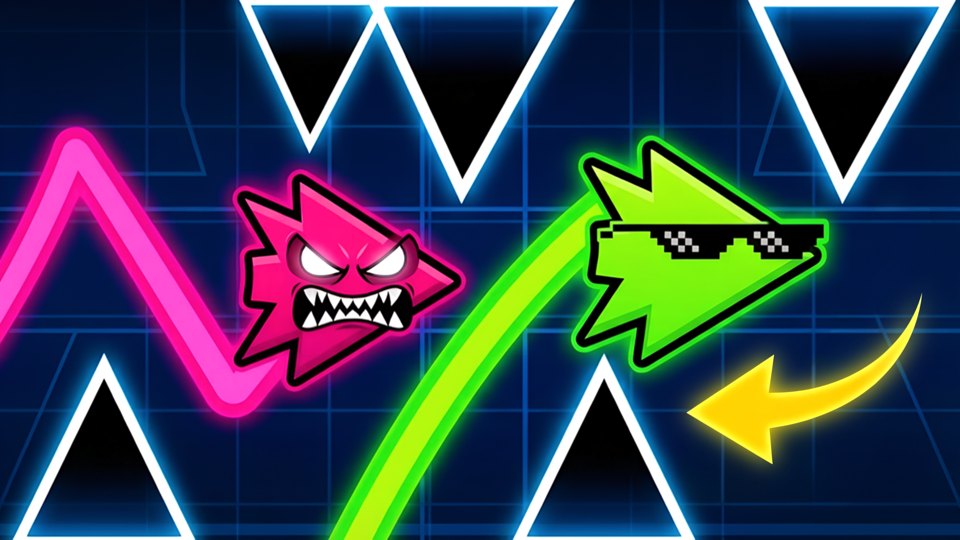
Geometry Vibes is a reaction-based arcade game where you avoid obstacles, traps and spikes that come at you in waves. Your goal in the game is to keep your arrow on the route and take it as far as possible. Geometry Vibes, where the excitement never ends, invites you to challenge.

Use your mouse to play

Geometry Vibes

92%
1178Votes

Geometry Vibes is a reaction-based arcade game where you avoid obstacles, traps and spikes that come at you in waves. Your goal in the game is to keep your arrow on the route and take it as far as possible. Geometry Vibes, where the excitement never ends, invites you to challenge.

Game features

Play read: Obstacle waves reward rhythm and smooth corrections. Player path: Geometry Vibes gives the arcade, IO, and music game section another option for visitors moving through arcade, IO, music pages by theme and device fit; page clue: Hold left mouse click or the Up Arrow to fly upward, then release to dive down. Handling note: How to Play Geometry Vibes. The useful tie-breaker on this page is: Use short height adjustments instead of long holds. Device and pacing note: Geometry Vibes is worth checking on both desktop and mobile, especially because Use short height adjustments instead of long holds. Comparison cue: Geometry Vibes is a reaction-based arcade game where you avoid obstacles, traps and spikes that come at you in waves.

Controls

How to Play Geometry Vibes? The game is quite simple to play, but difficult to master. Try to continue without hitting obstacles. Click to "MOUSE LEFT-CLICK" or "UP ARROW" and hold to fly up. Release the button to dive down. In 2,3,4 Player game modes, players are controlled with "UP ARROW", "H" and "L". (MOUSE LEFT-CLICK and SPACE keys can also be used instead of W.)

Recommendation

Geometry Vibes is a good arcade, IO, and music game candidate when this note sounds like the session you want: Obstacle waves reward rhythm and smooth corrections. Start by checking the input style: How to Play Geometry Vibes. If that control setup feels awkward, start slowly enough to learn the input rhythm while using this page-specific note as the tie-breaker: Use short height adjustments instead of long holds. Geometry Vibes is worth checking on both desktop and mobile, especially because Geometry Vibes is a reaction-based arcade game where you avoid obstacles, traps and spikes that come at you in waves.

Geometry Vibes Review: Wave-Dodging Arrow Action With Multiplayer Chaos

Geometry Vibes is a reaction-based arcade game where players guide an arrow through waves of obstacles, traps, and spikes while chasing distance and survival.

A wave-based reflex challenge

Geometry Vibes uses a simple flight rule that creates immediate tension. Hold left mouse click or the Up Arrow to fly upward, then release to dive down. That single mechanic has to carry you through waves of obstacles, traps, and spikes. The arrow always feels close to danger, so survival depends on reading the route early and making smooth height changes.

Why the controls feel satisfying

The game is easy to start because the input is minimal, but mastering it takes rhythm. Holding too long sends the arrow into the ceiling pattern; releasing too much drops it into lower hazards. The best runs feel like a controlled wave, with small corrections instead of panicked taps. Multiplayer modes for two, three, or four players add a lively party-game layer, especially when several arrows are fighting the same style of obstacle pressure.

Best for Geometry-style arcade fans

Geometry Vibes is a strong fit for players who enjoy reaction games, distance challenges, and quick restart loops. It is not about exploration or upgrades; it is about clean execution. The music category fits the rhythmic feel of movement, even when the main focus is avoiding spikes. Players who like testing reflexes alone or with friends will appreciate its direct, high-focus design.

What works well

  • Simple hold-and-release controls create precise flight tension.
  • Obstacle waves reward rhythm and smooth corrections.
  • Multiplayer modes add fun local competition.

What to know

  • Players who dislike retry-heavy arcade games may find it demanding.
  • The core loop is focused on reflex survival rather than progression.

Tips

  • Use short height adjustments instead of long holds.
  • Watch the upcoming wave pattern, not only the current spike.
  • In multiplayer, focus on your arrow and ignore other players' panic.

Verdict

Geometry Vibes is a sharp reaction arcade game that turns simple arrow flight into tense wave-dodging, especially fun with multiple players.

FAQ

Can I open Geometry Vibes in the browser on PIVND.com?

Yes. PIVND.com keeps this as a browser arcade, IO, and music game page with the playable frame, control notes, device context, and related games in one place.

What should I check before playing Geometry Vibes?

Check the control note first: How to Play Geometry Vibes?. That is the quickest way to decide whether the game fits your device and patience level.

Is Geometry Vibes better on desktop or mobile?

desktop and mobile browsers are both represented. If the controls feel cramped, switch devices or use the related-game links to find a better match.